On October 19, SlowMist (@SlowMist_Team) disclosed DarkSword, a trojan infrastructure targeting iPhones. According to SlowMist's analysis, visiting a malicious web page in the browser may be enough to compromise a device, and the trojan focuses on stealing crypto wallets, keychain data and instant-messaging accounts.
SlowMist concludes that relying on Apple's system updates alone is no longer enough to solve the problem.
For the technical analysis, see SlowMist's original report. This article looks at what the disclosure means for blockchain teams and the defenses you can put in place.
1. Risks for blockchain teams
Exposure: money and conversations live on the same device
People who manage funds and sign transactions usually have wallets, exchange apps, an authenticator and Telegram on the same phone. Once that device is compromised, the damage goes beyond the assets on it: an attacker can also impersonate its owner to social-engineer colleagues and partners.
Process: no rules for devices used in fund operations
Most teams have no explicit policy for fund-operation devices. Updates depend on individual discipline, and there is no process for reporting and handling suspicious links. After an incident, it often takes a long time to establish which devices and accounts are affected.
Privileges: one device can move money on its own
If a hot wallet uses a single signature, or exchange withdrawals rely on verification from one phone, the security of that device is effectively the security of company funds.
2. Defense checklist (by priority)
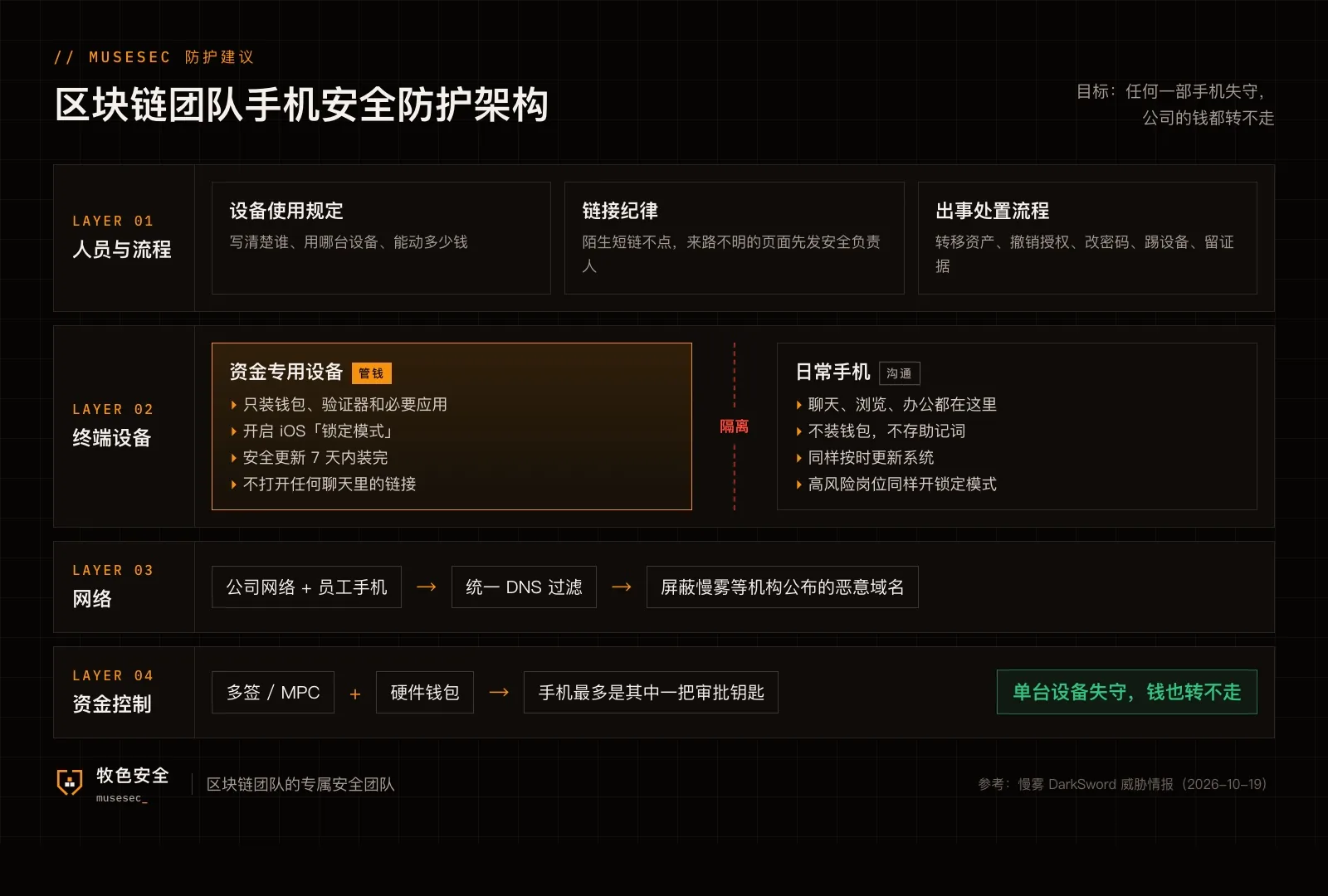
1. Separate fund-operation devices from everyday ones
Use a dedicated device for signing and withdrawals, install only wallets and essential apps, and never open links from messaging apps on it.
2. Never keep company funds on any single phone
Use multisig or MPC combined with hardware wallets, with a phone serving at most as one approval key. If one device is compromised, the funds still cannot be moved.
3. Set a deadline for system updates
Have everyone install Apple security updates within 7 days of release, and confirm versions through MDM or a weekly check instead of relying on individual discipline.
4. Turn on Lockdown Mode for high-risk roles
Executives, finance staff, signers and operations engineers should enable iOS Lockdown Mode, trading some functionality for a smaller web attack surface.
5. Block at the network layer
Route the company network and employees' phones through DNS filtering, and add the malicious domains published by SlowMist to the blocklist.
6. Set rules for links
Never open unfamiliar short links from text messages or direct messages. Pages of unknown origin, such as "free valuation" or "AI tool" sites, should be checked by the security lead first.
7. Prepare an incident playbook in advance
If a device may be compromised: create new wallets on an unaffected device, move the assets and revoke token approvals; reset exchange and Telegram passwords and sign out all other sessions; deal with the phone itself only after forensics are complete.
3. Summary
Mobile security comes down to policy: which people, on which devices, can move how much money. These rules are inexpensive to put in place, so we recommend establishing them early.